
System requirements:
- Windows Vista or newer
- .NET Framework 3.5
OpenRose is an open source program intended for making rose diagrams. It can be downloaded from https://sourceforge.net/projects/openrose/. Rose diagrams are used to show the orientation of particles in sedimentary geology, the orientation of joints and dykes in structural geology, and wind directions and frequencies.
OpenRose reads from a .txt file with a header on the first line and data on subsequent lines. The data must be an integer between 0 and 359.
The following is an example of the contents of a .txt file usable by OpenRose:
Wind Direction
40
45
38
66
153- To import this data into OpenRose, select File > Open or press Ctrl + O.
- Navigate to the .txt file containing the data and select Open.
- A rose diagram with “Wind Direction” as the title is created. The number of data points, minimum, and maximum are given in the left-hand corner.
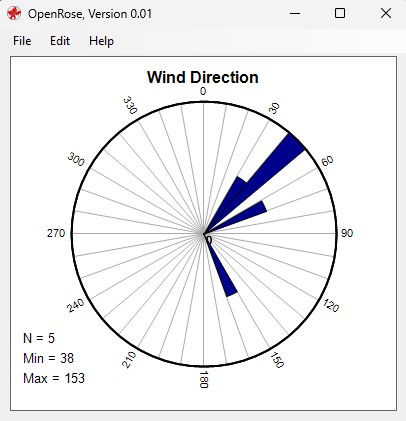
To copy the rose diagram, select Edit > Copy or Ctrl + C.
Additional Settings
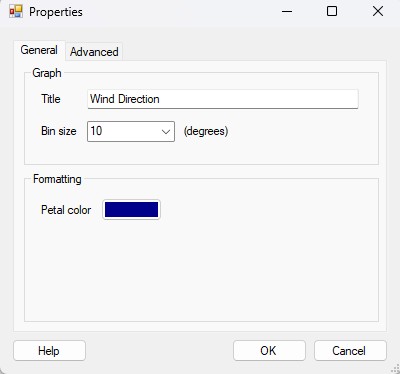
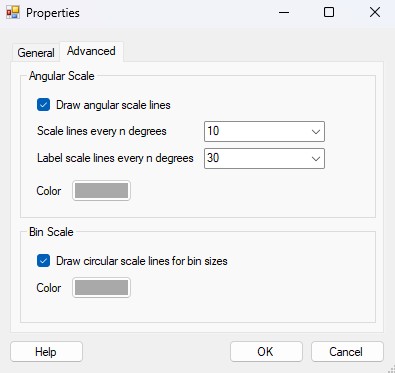
To change the petal color, edit the title, change the bin size (degrees), scale, and other settings, navigate to Edit > Properties to open the Properties window.
In the General tab, the title, bin size, and petal color can be modified.
In the Advanced tab, the angular and bin scales can be modified.
 Julienne Smith | Technical Writer
Leave a comment